LinkedIn is a powerful platform for building your brand, generating leads, and staying visible to the right audience. To support you effectively, ManageMe may require access to your LinkedIn account, and we want to be clear, transparent, and security-focused about how this works.
This guide explains what access we need, why we need it, and how your account stays safe.
Why ManageMe Needs LinkedIn Access #
Depending on your service package, LinkedIn access allows us to:
- Create, post, and schedule content
- Monitor engagement and performance
- Respond to comments (if agreed)
- Message potential clients, leads, or customers on your behalf
- Support lead generation and relationship-building
- Optimise your LinkedIn profile or Company Page
Without the correct access, our ability to support you may be limited.
Messaging Potential Clients, Leads & Customers #
When included in your agreed scope of work, ManageMe can support LinkedIn messaging and outreach in a professional and brand-aligned way.
This may include:
- Responding to inbound enquiries
- Sending approved outreach messages
- Following up with warm leads
- Managing conversations until handover (if agreed)
✅ All messaging is:
- Aligned with your brand voice
- Approved in advance or based on agreed templates
- Compliant with LinkedIn’s platform guidelines
- Focused on relationship-building, not spam
We will never message on your behalf without clear approval.
Types of LinkedIn Access We May Request #
The type of access required depends on the service you’ve signed up for.
1. LinkedIn Profile Access (Personal Account) #
This may be required if we are:
- Posting content on your behalf
- Supporting inbox management
- Messaging potential clients, leads, or customers
- Optimising your personal profile
⚠️ LinkedIn has limited delegation options for personal profiles, so access is handled carefully and only when necessary.
2. LinkedIn Company Page Admin Access #
This is the preferred and most secure option.
We may request:
- Content Admin – to create, publish, and manage posts
- Admin – only if full page management is required
This allows us to manage your page without accessing your personal login.
3. Third-Party Tool Access (If Applicable) #
If we are supporting scheduling, analytics, or outreach tools, you may be asked to:
- Connect your LinkedIn account to an approved third-party platform
- Grant permissions within LinkedIn
Clear instructions will always be provided.
How Your Account Stays Secure #
Your privacy and security are important to us. ManageMe follows best practices at all times:
- We only request the minimum level of access required
- Login details are handled securely and confidentially
- Access can be removed at any time
- Passwords are never changed without permission
- All activity aligns with LinkedIn’s terms of use
How to Grant LinkedIn Company Page Access #
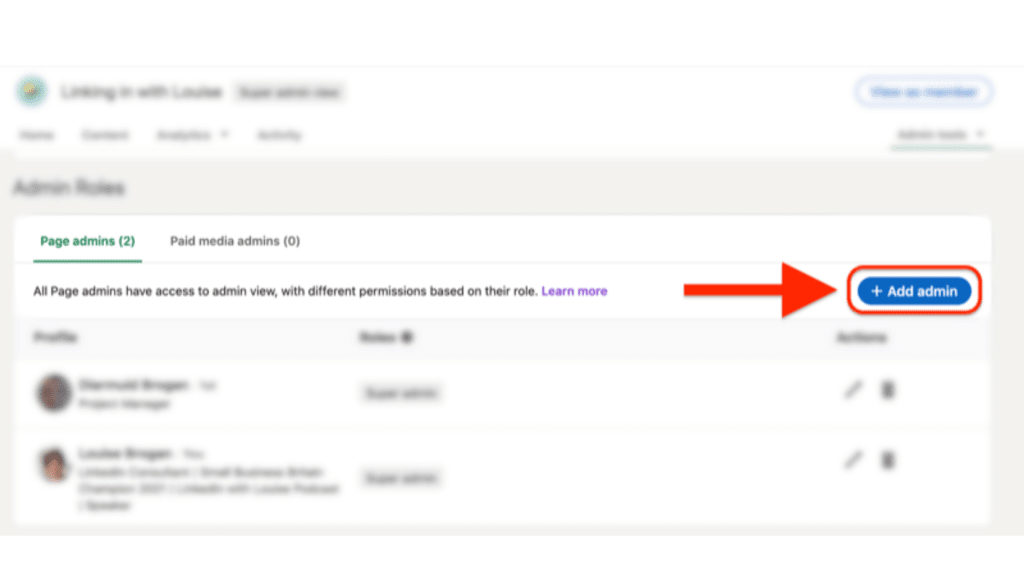
- Go to your LinkedIn Company Page
- Select Settings
- Click Manage Admins
- Add the ManageMe team member
- Assign the agreed role (usually Content Admin)
If you’d like, we can guide you through this step by step.
While LinkedIn starts the conversation, your essential business website pages are where the final conversion happens.
Frequently Asked Questions #
Do you message people without my approval?
No. Messaging is only done when it’s part of your agreed service and follows approved messaging guidelines.
Do you need my personal LinkedIn password?
Only if necessary and agreed in advance. Wherever possible, we use admin or delegated access instead.
Can I limit what you can do?
Yes. Access is tailored to your service scope.
Can I remove access later?
Absolutely! At any time.
Need Help Setting This Up? #
Granting access is the first step toward a more automated, high-performing LinkedIn presence. If you need help with the technical setup or want to see how we’ve helped other NZ professionals, we’re here to support you.
Book a Free Strategy Call: Let’s get your LinkedIn connected to your lead management system and start growing.


