
A Simple Guide for Business Owners #
Email workflows do not need to be complicated. In this ManageMe guide, we explain what email workflows are, how they work, and why they matter, using clear language and real examples. Perfect for business owners who want better follow-up without the technical overwhelm.
What an Email Workflow Really Is #
An email workflow is a set of emails that send automatically when something happens or after a certain amount of time.
You set it up once, and the system takes care of sending the right message at the right moment.
In simple terms, an email workflow helps you stay in touch with leads or clients without having to remember to send every email yourself.
A Real World Example #
Someone fills out a contact form on your website.
Instead of you manually responding and remembering to follow up, an email workflow can automatically:
- Send a welcome email straight away
- Send a follow-up email two days later
- Send another email a week later with helpful information
You write the emails once. The workflow handles the timing.
The Key Parts of an Email Workflow #
Every email workflow follows the same basic structure. Once you understand these parts, everything else becomes much easier.
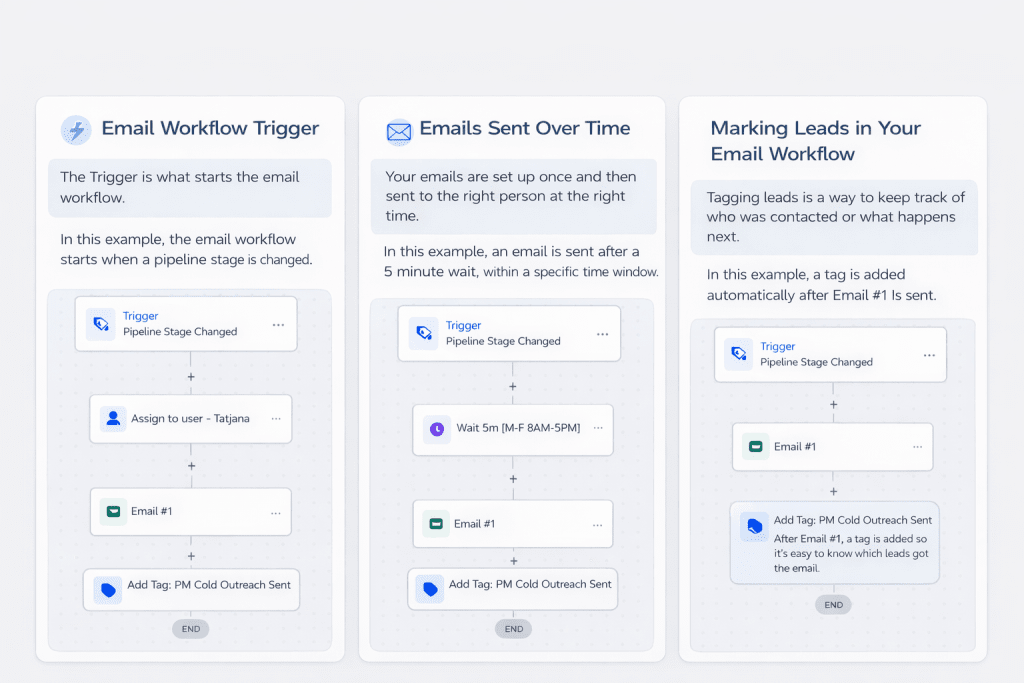
This image shows how an email workflow begins. A change in pipeline stage triggers the workflow, and the system immediately carries out a set of actions such as assigning ownership, waiting for the right time, sending the first email, and tagging the contact.
Trigger #
Before you build a full workflow, start by mastering the basics of triggers, actions, and conditions.
What Starts the Workflow #
The trigger is the event that tells the system to begin.
Examples include:
- Someone submits a contact form
- Someone joins your email list
- A booking is made
- A specific date arrives
In plain language:
When this happens, start the workflow.
Emails #
What Gets Sent #
These are the messages that go out automatically.
You decide:
- How many emails are sent
- What each email says
- The order they go out in
Common examples include:
- A thank you or welcome email
- Information about next steps
- A check-in email asking if help is needed
In plain language:
This is what we send.
Delays #
When Each Email Is Sent #
Delays are simply pauses between emails so messages do not all arrive at once.
Examples include:
- Wait one day after the first email
- Wait three days before the next message
In plain language:
Wait a little before sending the next email.
Conditions #
Optional Rules That Change the Path #
Conditions are optional rules that adjust what happens based on behaviour.
Examples include:
- Only send the next email if the first one was opened
- Stop the workflow if someone replies
- Skip certain emails for existing clients
In plain language:
Only continue if this is true.
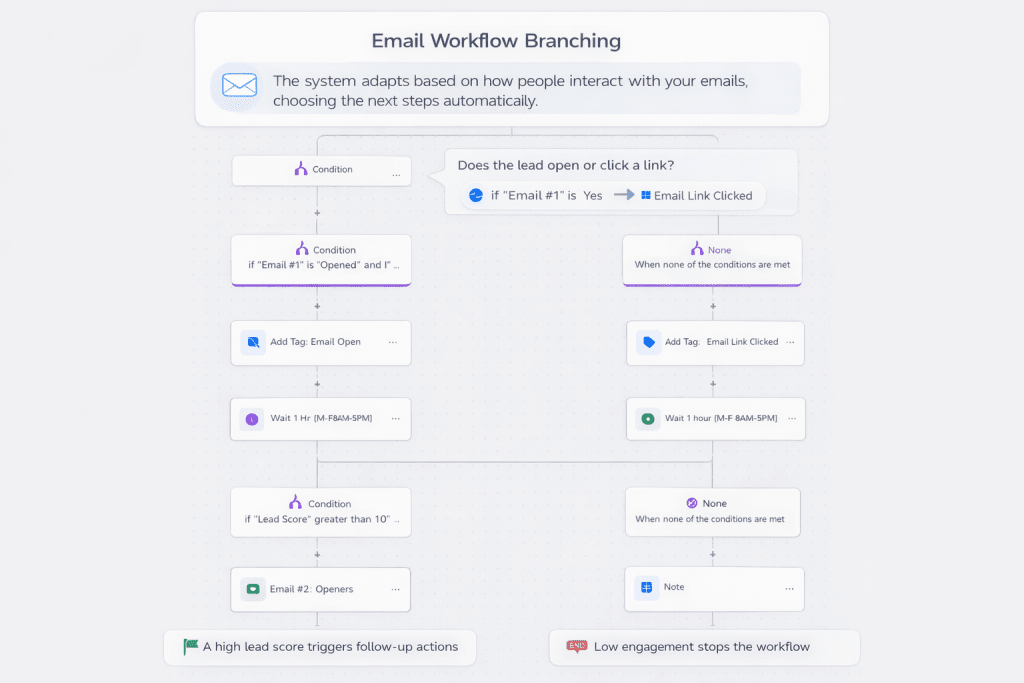
This image shows how email workflows adapt based on behaviour. The system checks whether an email was opened or clicked and then chooses the next steps automatically, such as sending follow-ups, updating lead scores, or stopping the workflow entirely.
How It All Works Together #
Here is a simple example of a basic workflow.
- Trigger
Someone submits a contact form - Email 1
Thank you for getting in touch (sent immediately) - Delay
Wait two days - Email 2
Here is what happens next - Delay
Wait three more days - Email 3
Any questions? We are here to help
This is an email workflow. One setup. Multiple touchpoints. No manual sending.
Why Email Workflows Matter #
Email workflows help your business because they:
- Save time by reducing manual follow-up
- Create a consistent experience for every lead
- Make your business feel organised and responsive
- Continue working even when you are offline
How to Explain Email Workflows Simply #
If you ever need to explain this to someone else, you can say:
“An email workflow is a set of emails that send automatically when something happens, like someone filling out a form. I set it up once, and it handles follow-up for me.”
No jargon. No complexity. Just clear communication.
Want to Plan Your First Workflow? #
We help businesses map out email workflows that feel natural, helpful, and easy to manage.
If you want templates or guidance, we are here to support you.


